


Staction Task Manager

Staction represents absolutely innovational tool forteam collaboration and project management. This very unusual tool is designed with the communication in mind. Staction is an extremely simple and fast way for team members to keep each other up to date on the work that they are doing. As the developers emphasize, this solution is absolutely different and should be compared with standard ones (such as Basecamp and etc.). No doubt some users will love this tool because it allows them to work together and communicate while working; still for others this solution may just not work for several reasons.
Here is the first screenshot – Home page:

The most important thing is the communication panel located in the middle. It’s used to communicate and create projects and tasks (using tags). Created projects and tasks automatically appear in the second panel – the sidebar.
The next screenshot presents a Detailed View of Home page:

In fact this screenshot was made just to provide you a better view of two panels, which represent the only things you are going to work with. As you can see the sidebar has a search box and a timer for tracking time you spend on fulfilling the tasks.
Main characteristic features:
- Simplicity and intuitiveness
- Time tracking
- SSL encryption
- Opportunity to generate summary pages
- Tag-based organization system and etc.
Pros and cons:
+ extremely easy communication
+ pretty attractive interface
+ easy-to-use
+ auto-completer for the meta box
– no descriptions for tasks
– no separate panel for files
– no calendar
– no subtasks
Customer support service
We didn’t get the response at all.
Project Mark: 3+
Wrike Project Management Tool

Wrike is an easy-to-use and intuitive business management solution that makes your project planning and management quicker and easier. It offers a new approach of collaboration based on email communication. Wrike has quite an unusual folder structure, which is very flexible and allow managers to coordinate every tiny detail of their projects. Its dynamic timeline provides users a real-time, clear picture of multiple projects. It’s a pretty complete tool, but some users may not like the way it works.
For now let’s take a lot at Dashboard page:

Dashboard consists just of project activity – the list of current and overdue tasks. Moreover you can see if there are some comments on tasks.
Here is the screenshot of Project with Tasks page:

This page is very informative and has everything you need: descriptions for projects and tasks, status of tasks, the amount of comments, the opportunity to request status update, editing tasks and etc.
The last screenshot to check is Discussion of a Task:

Here you can just check existing and add new comments with rich formatting options. Moreover there is opportunity to edit and delete comments.
Main characteristic features:
- Very simple and easy-to-use tool
- Folder structure for projects and tasks
- Different prices for managers, collaborators and viewers
- Windows Mobile sync
- Outlook sync and etc.
Pros and cons:
+ very intuitive hierarchical folder structure of the interface
+ ability to add as many subfolders as you want
+ comments on projects and tasks
+ descriptions for projects and tasks
+ rich text formatting
+ priority for tasks
+ Gantt chart
+ detailed reports
– no separate panel for discussions (in fact there is no need in it)
– no Calendar
Customer support service
Though we got a response, it took customer support several days to answer.
Project Mark: 4+
Comparative table
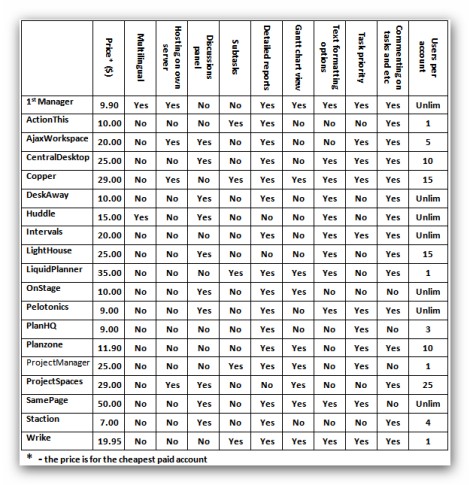
The Bottom Line
Due to the fact that you have all the information to make a right final decision, we are not going to recommend or suggest you something. The information provided in this review is more than enough to choose the service, which will correspond to all your needs.
Though you are able to check whether we got the response from customer support or not, there is a small possibility that some of them didn’t respond just because they didn’t get anything (but frankly speaking the possibility is too small – we sent all the messages from Gmail or via form on the site).
Finally, as it was promised, we are going to choose the tool, which seems to be the best one from the list for us. Lampdocs choice – DeskAway Management Tool. Despite the fact that CentralDesktop got just the same mark, there were some things (the most important one – affordability) that made us to choose DeskAway. Please let us know your opinion!
Hopefully you will be able to get a right tool from the list described in this review.
Vadim,
Thank you for evaluating Wrike. We’re sorry that your email was not answered right away. It is our policy to reply all the support emails within 24 hours, so we apologize that it was different for you.
By the way, we’re working on a number of cool enhancements, including the Timeline improvements, recurring tasks, iPhone app, new user inteface, etc. So stay tuned!